
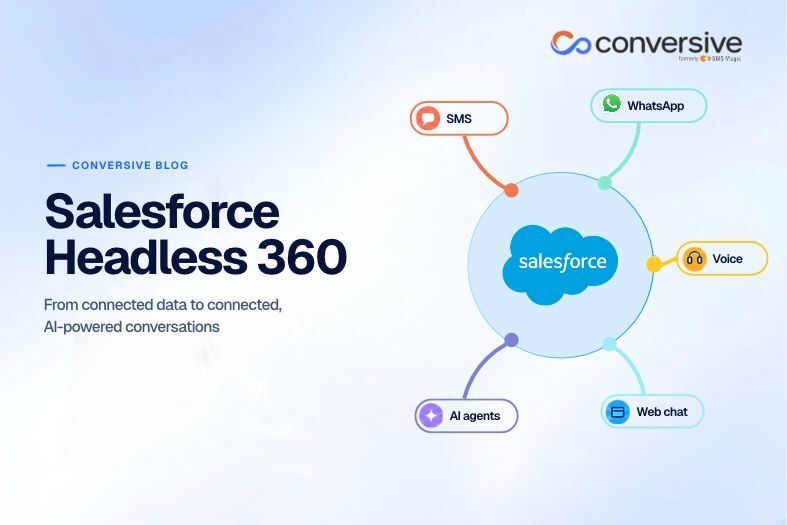
Salesforce Headless 360 makes CRM data available to any app, device or AI agent. Conversive turns that data into connected conversations across every channel and syncs each outcome back to Salesforce.
The modern customer is a demanding creature. When interacting with a business, they expect to be consistently recognized and understood. They also expect organizations to support and assist them on their preferred channel, whether it’s SMS or WhatsApp, mobile app or website, voice call or web chat. Salesforce CRM provides a trusted and tested way for organizations to meet this demand. This cloud-based CRM platform provides unified 360-degree customer views so businesses can better know their customers and build relationships with them.
That said, Salesforce has a drawback. Every user interaction with Salesforce has to happen through a traditional Salesforce interface – a requirement that doesn’t suit modern workers or workflows. For one, workers cannot spend entire workdays inside the CRM to work with customer data and business processes. Increasingly, they also do a lot of work through other business applications, communications platforms, mobile tools, and AI assistants. Thirdly, they don’t have time to manually perform CRM activities. Then there are AI agents. These intelligent digital workers don’t go to browsers or click through user interfaces but rather call APIs, invoke MCP tools, and run CLI commands.
Salesforce Headless 360 helps ease these challenges. This architectural paradigm makes Salesforce capabilities, business logic, and customer information accessible to external applications, interfaces, and AI agents. This allows organizations to extend their existing Salesforce environment beyond traditional CRM interfaces, that too without having to rebuild the environment.
That said, making customer information accessible from any user interface is only the first step towards stronger customer engagement and enhanced customer experiences. A unified communication layer is even more important. Here’s where Conversive comes in.
Where Headless 360 delivers Salesforce capabilities and complete customer records from any interface, Conversive provides the means to connect those records in a meaningful and contextual way. Conversive helps businesses to combine AI, contextual intelligence, and human expertise so they can effectively interpret customer intent, maintain conversational continuity across channels, automate routine requests, and seamlessly transfer conversations to human experts if needed. With Conversive’s Salesforce-integrated context, messaging, conversational AI, unified inbox, and workflow automation capabilities, any customer-facing business can move beyond just connecting customer data toward delivering connected customer experiences. And in doing so, they can convert more of the demand they already have at every stage of the funnel – with increasing ad spend or staff.
What is Salesforce Headless 360?
In April 2026, Salesforce announced the launch of Salesforce Headless 360 with the intriguing hook: “No browser required”. These 3 words typify what the term headless means – a design approach that separates (“decouples”) the CRM’s the front-end user interface (UI) from the back-end data, business logic, and underlying applications.
With Salesforce Headless 360, businesses can:
- Manage customer data in a single repository
- Build custom interfaces for any device
- Deliver experiences on any surface and for any customer-facing process
Salesforce Headless 360 comes with Model Context Protocol (MCP) tools and Application Programming Interfaces (APIs) that allow users – both human and AI agents – to easily access Salesforce capabilities from any interface, regardless of whether they are using Salesforce Customer 360 apps, Data 360, or external applications and interfaces like Slack, Microsoft Teams, or WhatsApp. Furthermore, the MCP tools ensure that the company’s coding agent can fully access the data, workflows, and business logic it needs to seamlessly and instantly execute complex tasks.
It’s important to note that Headless 360 is an architectural choice, not a replacement for Salesforce CRM. Specifically, it is an API- and MCP-driven extension and architectural layer that sits on top of Salesforce CRM. Headless 360 exposes Salesforce data, business logic, and workflows as APIs, MCP tools, or CLI commands, making them all accessible to apps, users, and autonomous AI agents. Only the surface changes while the underlying CRM platform remains intact.
Why does access to customer data not guarantee better customer conversations?
Salesforce Headless 360 helps make relevant customer information – purchase histories, service cases, appointments, contact preferences, and so on – accessible from any interface. This flexibility can be a boon for busy teams, expanding tech stacks, and agentic enterprises.
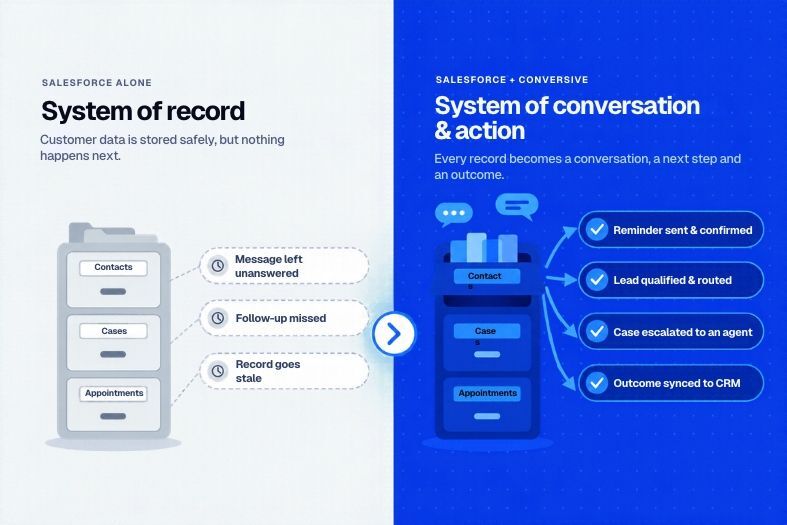
However, even complete, easily accessible Salesforce records cannot help teams to engage in enhanced conversations, initiate appropriate action for each request, and convert more incoming demand into measurable outcomes. Many businesses still struggle to capture, qualify, convert, and nurture customer demand. The reason: they lack a mechanism to connect the information from all sources and to make it actionable.
And here’s why these problems emerge.
i) Customer records do not always capture the latest conversational context
Customer information may reside in a host of places, including SMS threads, phone calls, email conversations, and external messaging applications. These systems need to be properly integrated, otherwise the data remains scattered within them and the correct context may not be available to employees responding through another channel. This creates knowledge gaps that may adversely affect customer interactions and experiences.
ii) Different channels can create disconnected customer experiences
Prospects and customers may utilize multiple channels to communicate with a business. Their conversation history, needs, and unresolved requests need to travel with them across all these channels. For this to happen, all communication systems must share relevant, up-to-date information. Otherwise, each channel may become a separate interaction, necessitating unnecessary repetition and lengthening resolution times. These issues can frustrate customers and leave them dissatisfied with the firm.
iii) Customer context must influence the next action
A CRM can show a customer’s profile, with details such as their name and contact details. However, accessing the profile is just one step towards truly understanding the customer and their needs.
Businesses must also be able to determine the customer's intent and accordingly identify the appropriate downstream actions. Here’s where a communication workflow plays a critical role. With this workflow in place, the next action quickly becomes clear so the conversation never breaks and the customer receives the appropriate and timely support they require, either through an automated system or a human representative.
iv) Communication outcomes must return to Salesforce
Finally, writing information into Salesforce is as important as retrieving information from it. From customer responses and conversation outcomes, to status changes, service updates, and follow-up activities – everything must be documented in the appropriate Salesforce records. This ensures that a detailed context is always maintained for every customer and customer interaction, which then allows future interactions to build on previous conversations. This enables the firm to engage with customers in continuous and seamless conversations at any time, across any channel, and to satisfy any problem or need.
How Salesforce Headless 360 supports conversations across SMS, WhatsApp, voice, and web chat
Here are some ways Salesforce Headless 360 facilitates rich, native interactions across multiple communication channels:
By supporting all of these channels, Headless 360 can help reduce repeated questions, minimize the probability of missed responses, and prevent disconnected follow-ups. That said, simply supporting multiple channels or updating CRM records is not enough to plug conversational gaps or prevent customers from leaving. Companies also need to ensure that customer conversations are contextual and continuous across every channel. And this continuity does not happen automatically. It depends on accurate identity matching, appropriate integrations, permissions, and the communication platform's supported features. This is where Conversive and Salesforce Headless 360 make a powerful team.
Conversive acts as the communication layer that unifies and orchestrates customer records, conversations, customer intent, business rules, and channels. This makes it easy for businesses to maintain relevant communication records in Salesforce and use up-to-date context in every customer interaction, so they can convert more opportunities, build lasting customer relationships, and drive repeat business.
So where Salesforce by itself is a system of record, Conversive transforms it into a system of conversation and action.
Salesforce Headless 360 in real customer communication workflows
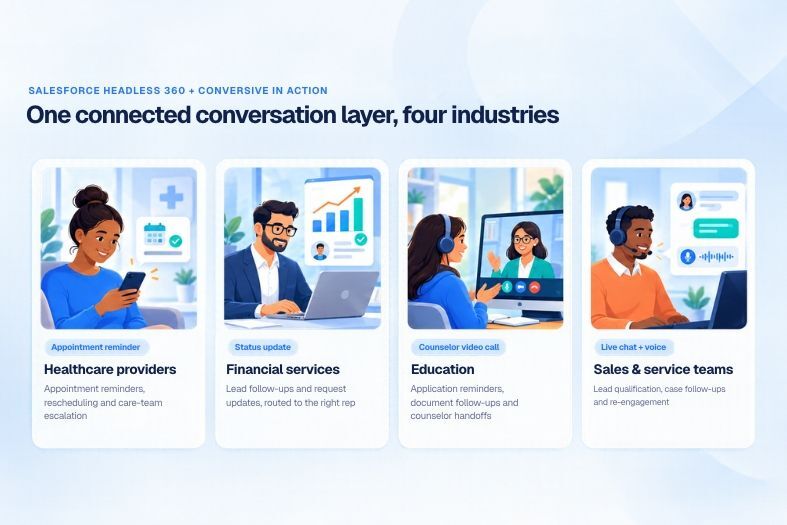
Here are four everyday scenarios that demonstrate how a headless CRM architecture could work with Conversive-enabled contextual intelligence, connected communication, and human-in-the-loop to help businesses own every customer conversation and plug conversion gaps.
i) Healthcare providers
When appointment messages run from the same Salesforce records your schedulers and care coordinators use, patients get timely reminders and teams see every reply in context. Here’s how healthcare teams commonly put this to work:
- Appointment confirmations and rescheduling.
- Routine reminders and follow-up messages.
- Escalation to scheduling or care coordination teams.
- Appropriate handling of sensitive patient information
ii) Financial services
Tying messaging to Salesforce records keeps each conversation with the person responsible for it and keeps a clear record of what was said and when. Popular use cases for financial services teams include:
- Lead follow-ups based on Salesforce records.
- Application or service-request status communications.
- Routing customer responses to the responsible representative.
- Maintaining appropriate records of customer interactions
iii) Education institutions
Connecting admissions communication to the applicant record lets counselors pick up each conversation where it left off instead of starting over. Admissions teams most often use it for:
- Application status reminders.
- Document submission follow-ups.
- Admissions counselor handoffs.
- Communication continuity across channels
iv) Sales and service teams
With message history attached to the lead or case in Salesforce, reps can qualify, follow up, and escalate with the full context already in front of them. Common ways sales and service teams use this:
- Lead qualification and appointment scheduling.
- Service case follow-ups.
- Customer re-engagement.
- Conversation ownership and escalation
How Salesforce Headless 360 connects to and works with Conversive
Conversive is not a CRM, neither is it a replacement for Salesforce's data or application architecture. Rather, it is a Salesforce-connected customer communication platform that enables businesses to use customer context in their conversational workflows, so that every message becomes part of one continuous customer journey. It complements the architectural foundation provided by Salesforce Headless 360 that makes Salesforce capabilities accessible across applications and interfaces.
Conversive is purpose-built to orchestrate the entire customer journey across channels with memory, context, and the business's own intelligence. This makes it vastly different from fragmented systems that only manage separate pieces of the journey. For example, the CRM stores customer data, the contact center routes calls and messages, and the chatbot answers customer queries. However, none of them connect the pieces into a cohesive whole. These fragmented systems don’t talk to each other, often resulting in conversion leakages, customer frustration, and missed revenue opportunities.
Thus, where these systems can only communicate or store information, Conversive can also understand, remember, and act. It is these intelligent, autonomous capabilities that empower businesses to:
- Capture demand from every source 24x7
- Qualify intent
- Convert qualified intent into action
- Keep the conversation together across every channel
- Initiate the right action at the right time
- Nurture customer relationships post-conversion
Typically, here’s what a customer communication workflow would look like with Conversive “connected” to Salesforce Headless 360:
i) Conversation initiation
A customer sends a message to the business through a supported channel (SMS, email, WhatsApp, etc.).
ii) Customer identification and context retrieval
The workflow identifies the customer and retrieves permitted Salesforce information and context.
iii) Response determination
The configured automation or a human employee determines and initiates the appropriate response.
iv) Conversation management
Context travels with the customer across every channel, so interactions don’t have to start from scratch, conversations don’t break, and customers are more likely to get fast resolutions to their problems.
v) Salesforce synchronization
Conversive updates Salesforce CRM with relevant interaction activity, status changes, and conversational outcomes. Every conversation makes the CRM richer than it was before.
This connected approach turns every customer interaction into a goal-directed journey and ensures that demand doesn’t fall through conversational cracks. This way, organizations can capture and convert more demand, and recover more revenues than would be possible with Salesforce alone.
Connected customer conversations require more than connected customer data
Salesforce Headless 360 separates business logic and data from traditional user interfaces so organizations can more easily access Salesforce capabilities and customer data across applications, interfaces, and AI agents. However, ready access to this data alone cannot close communication gaps or convert more demand into outcomes. To achieve this objective – as well as to enhance customer experiences, garner customer loyalty, and increase revenues – customer information must also be connected and contextualized across channels. It’s equally important to coordinate messages, automate routine interactions, and maintain continuity across channels.
Here’s where Conversive comes in.
Conversive connects supported channels, automations, conversational AI, and customer-facing workflows with Salesforce. It thus ensures that customer data is not only accessible, but usable and actionable at all times and on every channel. With Conversive, businesses can leverage a powerful and intelligent communication layer in order to engage in better customer conversations, make every interaction more informed and consistent, and keep customers engaged long after they have already converted.
Schedule a demo to know how the Conversive AI-powered demand capture and conversion platform can optimize your customer communication strategy and deliver measurable business outcomes.
Frequently Asked Questions (FAQs)
1. Is Salesforce Headless 360 a separate Salesforce product?
Salesforce Headless 360 is not a single, standalone product. Rather, it is an architectural approach that allows businesses to access and use Salesforce CRM capabilities through any user interface, AI agent, or external application.
2. What is the difference between Salesforce Headless 360 and Salesforce Data 360?
Data 360 is Salesforce's data platform for connecting, organizing, and unifying information from different sources to Salesforce without having to build data pipelines. Headless 360 provides a way to make Salesforce capabilities available across different interfaces and agents.
3. Does Salesforce Headless 360 replace Salesforce CRM?
No. Salesforce CRM remains the underlying backend system for storing and managing customer data, sales activities, service cases, and business processes. By adopting a headless approach, organizations don’t have to work inside Salesforce to use Salesforce. Instead, they can access relevant Salesforce capabilities through other applications and interfaces.
4. Can Salesforce Headless 360 support WhatsApp and SMS communication?
Yes. Salesforce Headless 360 delivers a new experience layer that delivers native interactions across multiple channels. However, managing conversations, routing messages, maintaining interaction history, automating responses, and updating the CRM may require a dedicated communication platform like Conversive.
5. How does Salesforce Headless 360 work with Agentforce?
Agentforce is a system of agency that enables organizations to build, deploy, and manage AI agents at scale across multiple channels. Together, Agentforce and Headless 360 can support AI-powered customer engagement across different interfaces, provided that an appropriate Salesforce-integrated communication workflow is in place.
6. Can businesses implement connected customer conversations without rebuilding their Salesforce environment?
Yes. With Salesforce Headless 360, organizations can extend their existing Salesforce environment for any customer-facing process through APIs, integration services, and communication platforms like Conversive. This removes the need to rebuild the CRM architecture.


