Patient communication software connects enquiries, scheduling, reminders, follow-ups, and ongoing conversations across the patient journey. This guide covers the features, security requirements, EHR integrations, and workflows healthcare teams should consider when choosing a platform.
A patient may first contact a healthcare provider to ask about symptoms, confirm insurance coverage, find a specialist, or book an appointment. That conversation can continue through scheduling, pre-visit instructions, reminders, test updates, treatment follow-ups, and future care.
And many healthcare organizations still manage these interactions through separate phone lines, inboxes, messaging tools, and patient records. This separation creates problems. Patients repeat information when they move between channels. Staff spend hours making reminder calls, checking multiple systems, and manually updating records. Enquiries can remain unanswered, appointment requests may not become bookings, and follow-ups can be missed after the patient leaves the facility.
Patient communication software brings these interactions into a connected system. It helps healthcare teams manage two-way conversations, automate routine messages, route inquiries to the right staff members, and maintain communication history across the patient journey. More advanced platforms can also connect SMS, WhatsApp, voice, and web-based conversations with EHR, CRM, and scheduling systems.
In this article, we’ll discuss how patient communication software works, which features healthcare teams should look for, how HIPAA requirements affect messaging, where EHR integrations fit, and why a unified communication platform matters for hospitals, clinics, and other care providers.
What is Patient Communication Software?
Patient communication software is a digital platform that helps healthcare organizations manage conversations with patients before, during, and after care. It brings communication channels, automation, staff workflows, and patient information into one system instead of treating every message as a separate interaction.
Patients may use it to ask questions, book or reschedule visits, receive preparation instructions, share documents, confirm referrals, or respond to follow-up messages. Staff can view the conversation history, assign inquiries to the correct team, and continue a discussion without asking the patient to repeat the same information.
A patient communication platform can support interactions at several stages:
- New patient inquiries and service questions
- Appointment booking, confirmation, and rescheduling
- Referral coordination
- Pre-visit forms and preparation instructions
- Test, treatment, and prescription updates
- Post-visit care instructions
- Recall and re-engagement campaigns
- Feedback and satisfaction surveys
Messages may be transactional, educational, automated, or conversational. Some require a simple confirmation, while others need a staff member to review the patient’s request and respond directly.
Why Healthcare Organizations Use Patient Communication Software
Patient communication often depends on staff moving between phone calls, email inboxes, scheduling tools, patient records, and messaging applications. Each additional system creates another place where an inquiry can be delayed, duplicated, or missed.
Patient communication software connects these activities within a shared workflow. Instead of relying on staff to manually track every interaction, healthcare organizations can automate routine messages, assign conversations, and monitor whether a patient has responded or completed the intended action.
1. Reduce Administrative Work
Appointment confirmations, preparation instructions, recall messages, and post-visit follow-ups are repetitive but necessary tasks. Automating them gives staff more time to manage conversations that require personal attention.
Shared inboxes also let team members see who is handling each inquiry. This reduces duplicate replies and makes it easier to transfer a conversation between reception, billing, scheduling, and care teams.
2. Improve Appointment Conversion and Attendance
A patient who cannot reach a practice may contact another provider. Faster responses, simple booking options, and two-way reminders help turn more inquiries into confirmed appointments.
Patients can also confirm, cancel, or request a different time without making another phone call. When a cancellation occurs, the platform can notify patients on a waitlist and help the practice fill the available slot.
3. Maintain Communication Across the Patient Journey
Communication does not end once an appointment is booked. Patients may need preparation instructions, directions, treatment updates, or follow-up support. A connected conversation history helps staff understand what has already been discussed and what should happen next.
Features You Should Look for in Patient Communication Software
The right feature set depends on how a healthcare organization communicates with patients, how its teams are structured, and which systems already manage appointments and patient records. A small clinic may prioritize reminders and two-way texting, while a hospital network may require department-based routing, detailed permissions, and integrations across several locations.
Look for these features while looking for patient communication software:
1. Patient-Facing Communication Features
Patients should be able to contact the organization through familiar channels without complicating the process. The platform should allow patients to ask questions, receive updates, and respond to staff through two-way messaging.
It should also support appointment booking, confirmation, cancellation, and rescheduling. Automated reminders can give patients enough time to confirm their visit or request another slot, while pre-visit messages can share forms, directions, and preparation instructions.
Patients should be able to choose their preferred communication channel where possible. The platform should also record consent, manage opt-out requests, support multilingual communication, and provide a clear path from an automated response to a staff member.
2. Staff and Clinical Workflow Features
A shared inbox should help teams manage conversations rather than simply collect incoming messages. Staff should be able to assign each inquiry to a person, department, location, or service line. Clear ownership helps prevent delayed responses and duplicate replies.
Role-based access should limit patient information according to each user’s responsibilities. Internal notes should allow staff members to share context without displaying those comments to the patient.
The platform should also provide delivery status, read receipts, searchable conversation histories, and escalation rules. Authorized users may need mobile access when they work across facilities or respond outside a central office.
3. Automation and AI Features
Automation should manage predictable communication without removing staff oversight. The platform can answer approved questions, collect basic information, send appointment reminders, and trigger follow-ups based on patient actions.
Intent detection can identify whether a patient wants to book an appointment, ask about billing, contact a department, or receive support after hours. The system can then route the conversation to the correct team.
Healthcare organizations should be able to define what the automated system may answer. Requests involving medical advice, urgent concerns, sensitive account issues, or uncertain intent should be transferred to an authorized staff member.
4. Administrative and Reporting Features
Managers need visibility into how quickly teams respond and whether communication leads to the intended outcome. The platform should report response times, message delivery, failed messages, appointment conversions, automation completion, and staff escalations.
Administrators should also be able to manage templates, user permissions, consent records, audit logs, and communication campaigns from one place.
Is Patient Communication Software HIPAA Compliant?
Patient communication software can support HIPAA-compliant workflows, but no platform makes an organization compliant simply by being installed. Compliance depends on how the software handles protected health information, how the healthcare organization configures it, and how staff members use it.
A healthcare provider should assess both the technology and the operating process around it. When a cloud platform creates, receives, stores, or transmits electronic protected health information on behalf of a healthcare organization, the provider and platform vendor generally need a Business Associate Agreement. The agreement defines permitted uses of the data and the vendor’s responsibilities for protecting it. HHS guidance also states that using an applicable cloud service without the required agreement can violate HIPAA rules.
What Should a Healthcare Messaging Platform Include?
A platform used for patient communication should provide safeguards that match the information and workflows it handles.
- The platform should use appropriate controls to protect data while it is stored and transmitted.
- Each user should have a unique account, with access based on their role and responsibilities.
- Authentication measures should verify that only authorized users can access patient information.
- Audit logs should record access, activity, and changes within the system.
- Automatic session controls should reduce the risk of an unattended device exposing patient information.
- The vendor should explain how it responds to security incidents and reports breaches.
- The organization should be able to manage retention, deletion, backup, and data recovery.
Encryption is important, but it is not enough on its own. HHS notes that healthcare organizations and their vendors must also consider access, availability, risk management, incident response, and other administrative, physical, and technical safeguards.
Is Standard SMS HIPAA Compliant?
HIPAA does not impose a blanket ban on electronic communication with patients. Healthcare providers may communicate electronically when they apply reasonable safeguards. However, ordinary SMS may lack controls such as user authentication, access restrictions, reliable audit records, and protected message storage.
For this reason, healthcare organizations should decide what information may appear in a standard text message. A basic appointment reminder carries different risks from a message containing a diagnosis, test result, or treatment details.
A secure patient messaging platform may use identity verification, protected links, consent records, controlled message content, and secure portals to reduce exposure. The organization should document its communication policy and train staff to follow it consistently. HHS advises healthcare providers to use reasonable safeguards when communicating electronically with patients.
How Does a Unified Patient Communication Inbox Work?
A unified inbox brings patient messages from SMS, WhatsApp, web chat, voice, and other supported channels into one workspace. Staff can view and respond to conversations without opening a separate application for each channel.
However, collecting messages in one place is only the first step. A message can still be overlooked if no one owns it, no response deadline is defined, or no workflow tracks whether the patient’s request was resolved. An effective system should connect every conversation with an owner, a next action, and a measurable outcome.
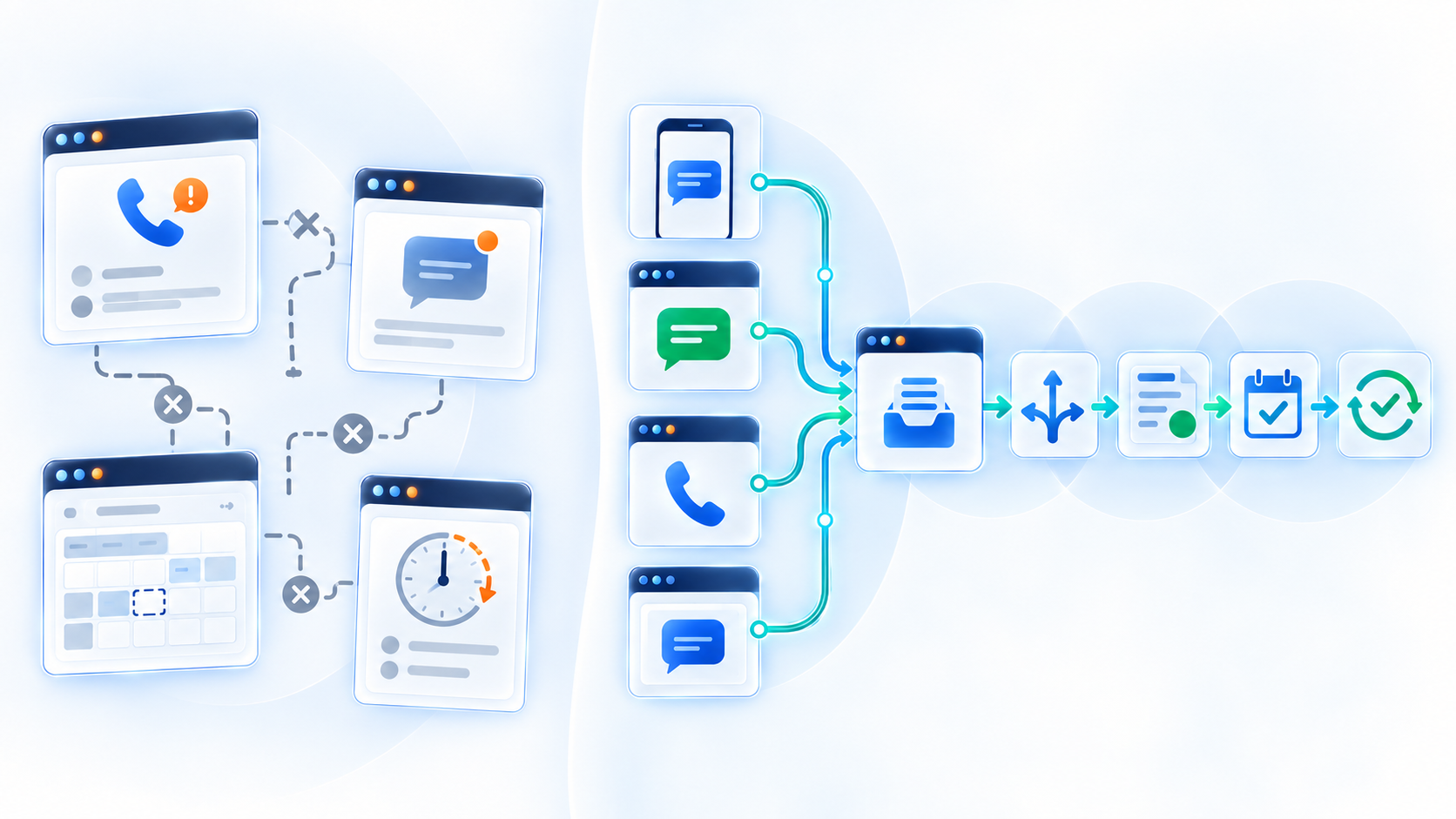
This is how a patient conversation moves through the inbox:-
- The patient starts the conversation through a preferred channel. They might send a WhatsApp message, submit a website inquiry, reply to an SMS reminder, or call the practice.
- The platform identifies the purpose of the enquiry. It can determine whether the patient wants to book an appointment, reschedule a visit, ask about billing, contact a department, or receive general information.
- Automation handles approved tasks. The system may answer a common question, collect basic details, share available appointment times, or send preparation instructions.
- The conversation is routed to the correct team. Rules can assign it according to the patient’s location, requested service, department, language, or stated need.
- A staff member receives the complete history. When human support is required, the employee can see the messages already exchanged and continue without asking the patient to start again.
- The outcome is recorded. The platform should track whether the inquiry resulted in a booking, rescheduled visit, completed follow-up, staff escalation, or another documented resolution.
This structure keeps connected patient conversations moving even when the patient changes channels. It also gives managers visibility into unanswered inquiries, delayed responses, incomplete bookings, and conversations that stopped before reaching an outcome.
A unified inbox can also support patients outside normal operating hours. Conversational AI may respond to routine questions, collect information, or help with scheduling. It should transfer urgent, sensitive, or uncertain requests according to rules set by the healthcare organization.
How Does Patient Communication Software Integrate With EHR Systems?
An EHR integration connects patient conversations with the systems healthcare teams already use to manage appointments, demographics, care records, and operational workflows. Without this connection, staff may need to copy information from messages into the EHR manually.
The communication platform does not replace the EHR. It acts as a communication layer that can read approved information from the EHR, trigger messages based on that information, and return relevant updates to the patient record.
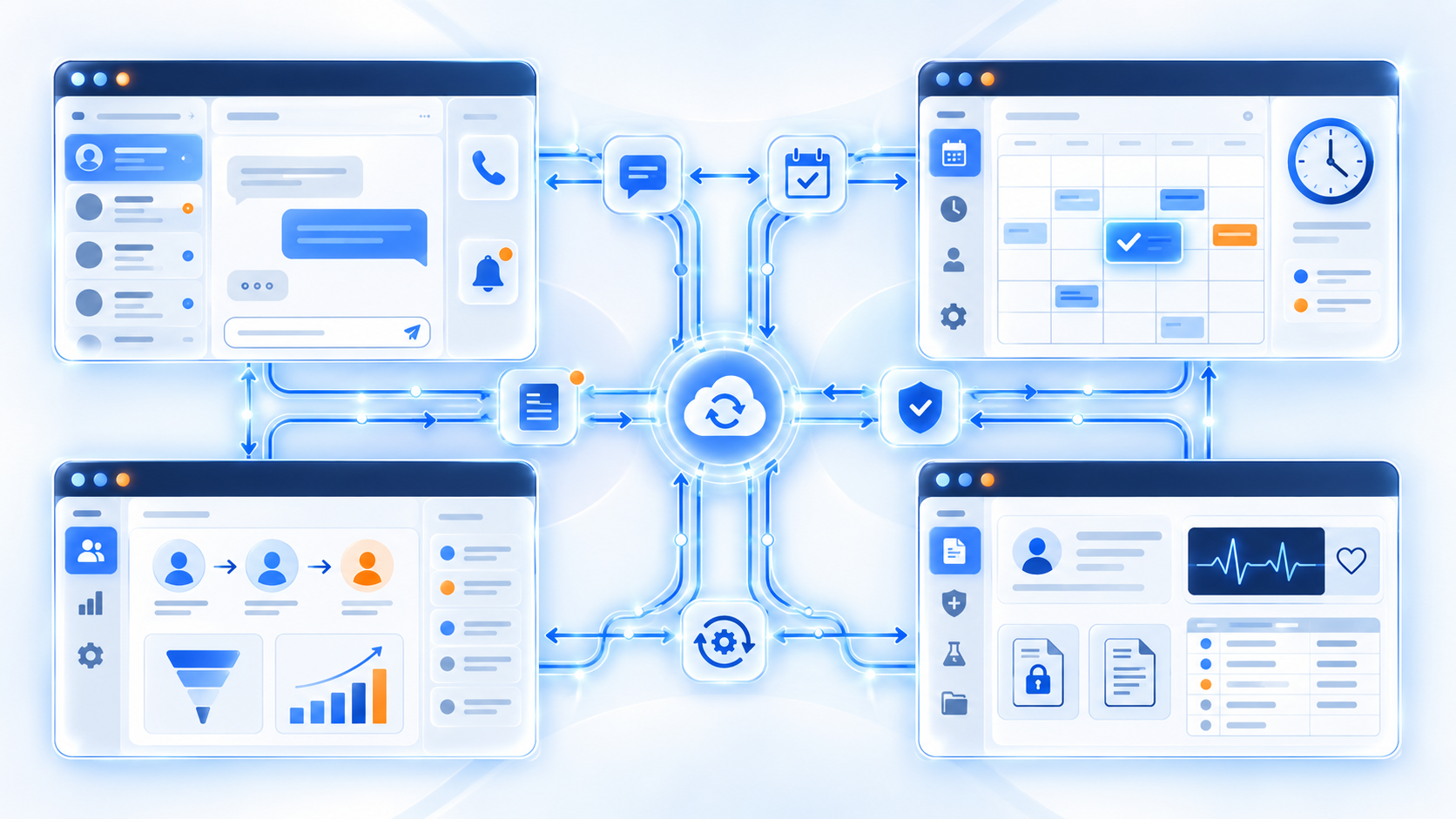
Patient communication platforms may connect with EHR and practice management systems in several ways:
- Pre-built connectors provide an established connection with supported healthcare systems. These connectors can reduce implementation time, although their available actions may vary.
- Application programming interfaces allow systems to exchange selected data and trigger defined workflows. The available data depends on the APIs supported by both platforms.
- HL7 interfaces can exchange clinical and administrative messages between healthcare applications. They are commonly used for events such as patient admission, discharge, transfer, and scheduling.
- FHIR provides a standardized structure for exchanging healthcare information electronically. It organizes information into reusable resources for patients, appointments, practitioners, observations, and other healthcare records. HL7 describes FHIR as a standard for electronic healthcare information exchange.
- Integration middleware can connect systems that do not communicate directly. It translates data and manages workflows between the communication platform and the healthcare system.
Why Choose Conversive as Your Patient Communication Software?
Conversive is designed to connect patient communication with the systems, teams, and workflows responsible for moving an inquiry toward a clear outcome. It works as a conversation layer alongside existing healthcare systems rather than asking an organization to replace its CRM, EHR, or practice management platform.
1. Manage Multiple Channels From One Workspace
Conversive brings communication through calls, SMS, WhatsApp, web chat, and other supported channels into a connected patient view. Staff can review previous interactions and continue the conversation even when the patient changes channels.
2. Automate Repetitive Patient Communication
Conversive can automate common tasks across the patient journey. Healthcare organizations can use it to respond to new inquiries, collect intake information, support appointment booking, send reminders, provide rescheduling options, and follow up after a missed visit.
Chat AI can handle approved questions and self-service workflows, while Voice AI can support call overflow, reminders, appointment recovery, and follow-up outreach. Rules can transfer conversations to staff when the system detects urgency, uncertainty, or the need for personal assistance.
3. Connect Communication With Existing Systems
Conversive can connect with CRM, EHR, EMR, practice management, scheduling, and marketing systems. This connection allows communication workflows to use the patient and appointment information already available within the organization.
The existing system remains the source of record, while Conversive manages the communication and action around that information. For organizations using Salesforce or Zoho, this can provide an alternative to developing and maintaining a custom conversation layer internally.
4. Support Governance and Measurable Outcomes
Conversive supports consent capture, communication preference tracking, role-based access, secure patient data handling, and audit-ready conversation logs. Healthcare teams can also monitor enquiry-to-appointment conversion, no-shows, slot utilisation, follow-up completion, and unresolved care gaps.
Organizations can begin with one workflow, such as after-hours inquiries, appointment reminders, or no-show recovery, and measure the result before expanding to other stages of the patient journey.
Book a personalized demo to assess how the platform would fit existing systems and communication processes.
Frequently Asked Questions
What is patient communication software?
The patient communication software is the platform that fits the organization’s existing systems, patient workflows, security requirements, and communication channels. A small practice may need two-way messaging and appointment reminders, while a hospital network may require department-based routing, AI-assisted communication, detailed access controls, and connections with multiple systems.
Can Patients Reply to Automated Appointment Reminders?
Yes, if the platform supports two-way messaging. Patients can confirm an appointment, cancel it, or request another time by replying to the reminder. The platform can process simple replies automatically and transfer unclear requests to the scheduling team. This gives patients an easier way to manage appointments while reducing inbound calls.
Does Patient Communication Software Replace a Patient Portal?
Patient communication software usually works alongside a patient portal rather than replacing it. The portal may remain the main place for accessing records, test results, bills, and forms, while the communication platform manages reminders, questions, scheduling, follow-ups, and conversations across channels.
Can Patient Communication Software Respond to Patients After Business Hours?
Yes. Patient communication software can use automated chat or voice workflows to answer approved questions, collect information, assist with scheduling, and acknowledge patient requests outside normal working hours.
Can Patient Communication Software Support SMS, WhatsApp, Voice, and Web Chat in One Platform?
Some patient communication platforms support several channels within one workspace. This allows staff to manage messages without opening a different application for each communication channel.
How Long Does It Take to Implement Patient Communication Software?
Implementation time depends on the number of locations, communication channels, integrations, workflows, security reviews, and staff groups involved. A focused appointment-reminder or patient-enquiry workflow may be deployed sooner than an organization-wide rollout connected to several healthcare systems.
Starting with one defined use case gives teams a manageable way to test the platform, train staff, measure results, and address workflow issues before expanding it.


.avif)